08 실습 - 자연어 상품 검색 및 응답 챗봇 (2)
1. 프로그램 spec 작성
Section titled “1. 프로그램 spec 작성”해당 프로그램을 만들기 위해서 spec를 docs/spec-shop-assistant.md 에 다음과 같이 작성합니다.
# 쇼핑몰 어시스턴트 챗봇 개발
## 1. 개요- 해당 프로그램은 쇼핑몰 어시스턴트 챗봇 프로그램이다.- 사용자가 챗봇에 상품과 애터미의 마케팅 플랜에 대해서 자연어로 질문을 하면 해당 질문에 대해서 자연어로 답변을 합니다.
## 2. 기능 구현- 상품 검색 Flow: 사용자 질의->의도파악 및 검색어 추출 -> 상품 검색인 경우 RAG 벡터 검색과 데이터를 추출 -> LLM에 해당 데이터 전달 및 답변 생성 -> 답변 출력- 상품 검색 결과를 LLM에 마지막 질의할때 사용자의 원 질문내용도 함께 전달이 반드시 되어야 합니다.- 마케팅 플랜 검색 Flow : 사용자 질의->의도파악 및 검색어 추출 -> 마케팅 플랜 검색인 경우 해당 마케팅 플렌 정보를 바탕으로 답변 생성 -> 답변 출력- 기타 답변 처리 Flow : 사용자 질의->의도파악 및 검색어 추출 에서 기타 처리하지 못하는 답변 생성 응답 -> 답변 출력
## 3. 프롬프트- 질문의 의도 파악은 prompt/query-process.md에 정의된 시스템 프롬프트를 사용한다.- 상품 검색의 결과 처리 프롬프트는 prompt/product-search.md에 정의된 시스템 프롬프트를 사용한다.- 마케팅 플랜의 결과 처리 프롬프트는 prompt/marketing-plan.md에 정의된 시스템 프롬프트를 사용한다.
## 4. 의도 파악 및 검색어 추출 응답 포멧- Output Format (JSON Only)아래 JSON 스키마를 준수합니다.{  "category": "product | marketing | general",  "search_query": "핵심 명사 키워드들의 조합 (띄어쓰기 구분)",  "general_msg": "카테고리가 general일때 정중한 답변 거절 메시지, 없는경우 none"}- 응답처리시에 category를 가지고 분기처리합니다.- **[중요]** LLM이 마크다운이나 일반 텍스트를 섞어 반환하여 발생하는 파싱 에러(JSONDecodeError)를 방지하기 위해, Gemini API 호출 시 `GenerateContentConfig` 내에 반드시 `response_mime_type="application/json"` 옵션을 추가해야 합니다.
## 5. 구현- gradio를 이용해서 UI를 만듭니다. 챗봇의 기능처럼 질의 및 응답을 처리하도록 하고 응답은 markdown 형식의 출력을 표시하도록 합니다.(Markdown 형식 출력 렌더링 지원)- gemini 모델은 다음을 사용합니다. **gemini-3.1-flash-lite-preview** 최신 모델이므로 **반드시** 해당 모델만 사용합니다. 다른 모델로 바꾸지 않습니다. (https://ai.google.dev/gemini-api/docs/models/gemini-3.1-flash-lite-preview?hl=ko 참고)- gemini sdk는 최신 SDK인 genai 를 사용해야 합니다.- gemini의 기존 문맥 대화를 기억하기 위해서 최신 질의/응답 5개를 전달합니다.- 상품검색시 vector 검색은 기존에 만들어진 chromaDB를 사용을 합니다. /chroma/ 디렉토리에 있으며 해당 vector 검색 코드는 vector-search-product.py를 참고하여 개발합니다.- 상품검색시 vector 검색 결과를 넘겨줄때 해당 백터의 meta테그와 함께 벡터검색의 document(원 text)를 LLM에 같이 전달합니다. 이때 상품은 Top N 5개 정보를 전달합니다.- 마케팅 플랜 검색시에는 해당 프롬프트와 함께 검색어를 같이 전달합니다.- Gemini API Key는 .env 파일에서 로드합니다.(GEMINI_API_KEY 로 변수 사용) python-dotenv 패키지를 사용합니다.- 채팅 창은 한줄로 넣고 엔터를 치면 응답이 되게 해주세요.(shift+enter는 여러줄, enter는 그냥 실행)- context7 MCP로 최신 API에서 반드시 확인해서 구현해줘
## 6. 실행 파일- 작업 파일은 shop-assistant.py로 작성합니다.- 디버깅 모드시 python 코드 수정시 즉각 반영되도록 수정해주세요.
2. 프로그램 개발 진행
Section titled “2. 프로그램 개발 진행”- 프로그램 개발전에 이전에 gemini를 사용하기 위해 key를 설정해야 합니다. “.env” 파일을 만들고 해당 키값을(별도 공유된) 넣습니다.
GEMINI_API_KEY={API 키 값}- 해당 Spec이 이미 자세한 내용을 포함하고 있기 때문에 별도의 Spec 생성 기능을 하지 않고 바로 프로그램 생성을 합니다. command 에서 해당 파일을 넣고 프로그램을 만들다라고 요청합니다.(예: docs/spec-shop-assistant.md 를 보고 해당 프로그램을 만들어주세요. 실행시 에러가 나면 모두 수정해주세요. 필요시 브라우져를 띄워서 디버깅 해주세요)
3. 프로그램 실행
Section titled “3. 프로그램 실행”다음처럼 프로그램을 실행하면 해당 접속 주소와 port가 나타납니다. 에러가 없으면 브라우져로 해당 주소로 접속을 합니다.
cmd> python shop-assistant.py✅ 프롬프트 파일 로드 완료✅ Gemini 클라이언트 초기화 완료 (모델: gemini-3.1-flash-lite-preview)[Alibaba-NLP/gte-multilingual-base] 임베딩 모델을 로드합니다...최초 실행 시 모델 다운로드로 인해 수 분이 소요될 수 있습니다.Some weights of the model checkpoint at Alibaba-NLP/gte-multilingual-base were not used when initializing NewModel: ['classifier.bias', 'classifier.weight']- This IS expected if you are initializing NewModel from the checkpoint of a model trained on another task or with another architecture (e.g. ini another architecture (e.g. initializing a BertForSequenceClassification model from a BertForPreTraining model).- This IS NOT expected if you are initializing NewModel from the checkpoint of a model that you expect to be exactly identical (initializing a BertForSequenceClassification model from a BertForSequenceClassification model).✅ 임베딩 모델 로드 완료!
⏳ ChromaDB 컬렉션을 로드합니다... (./chroma)✅ ChromaDB 로드 완료 (총 606개 상품)
* Running on local URL:  http://127.0.0.1:7860* To create a public link, set `share=True` in `launch()`.
4. 자연어 검색 실습
Section titled “4. 자연어 검색 실습”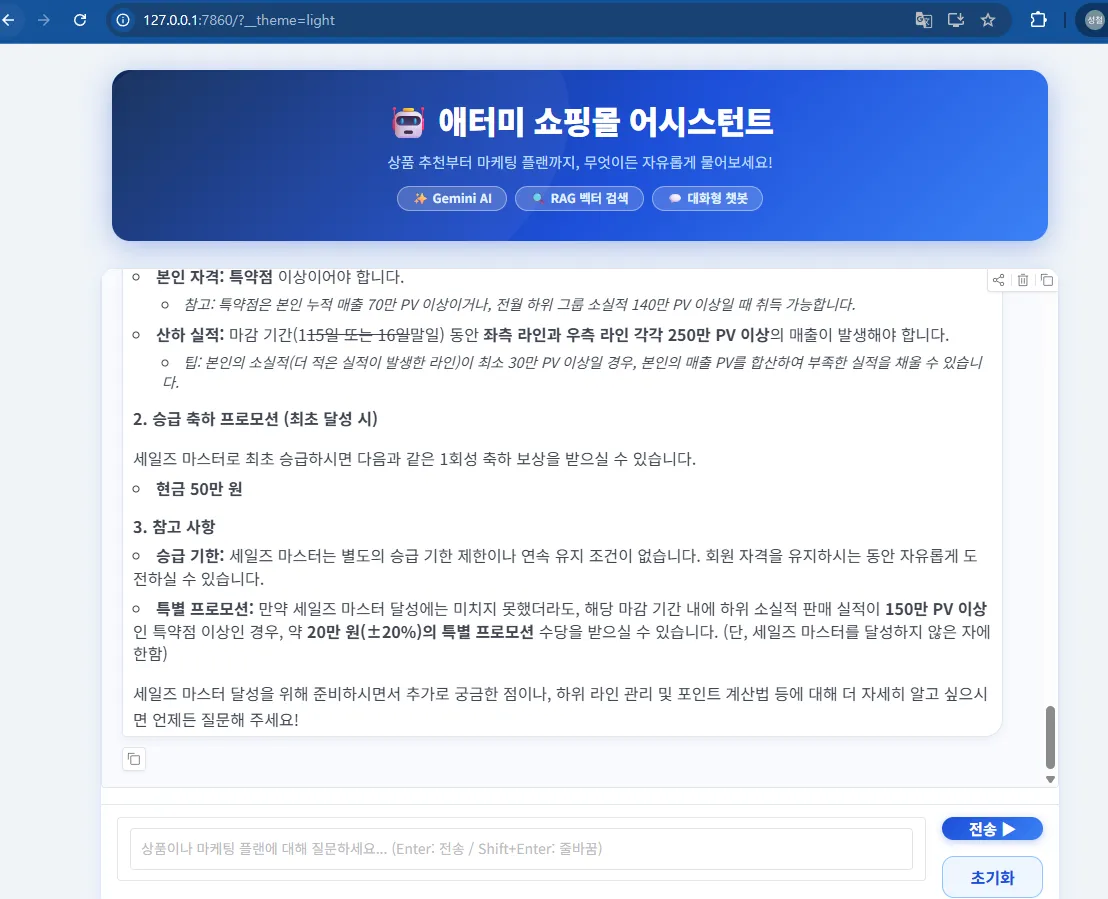
4.1 여러 케이스에 대한 실습
Section titled “4.1 여러 케이스에 대한 실습”- 해당 설계한 대로 동작을 하는지 실습합니다.
- 면역력에 좋은 제품이 뭐야?
- Can I find a product about sun cram? (영어 질문 / 영어 답변)
- 세일즈 마스터가 되려면 어떻게 해야되?
- 첫 수당은 어떻게 받을수 있어?
- 40대 여성에게 추천할 만한 화장품을 알려줘
- 프롬프트를 자신의 스타일에 맞게 변형해보세요
- 톤 앤 매너
- 친구 톤으로, 아나운서 톤으로, 경상도 사투리톤으로, 교육자 톤으로.. 등등
- 자유로운 대답
- 내부에 알고 있는 정보와 더불어 대답을 해줘(기존 환각 무시)
- 톤 앤 매너
- 기존 맥락을 알고 있는지(최대 5개) 확인해보세요.
- 이전 알려준 제품과 다른 제품도 알려줘
- 프롬프트 변경시에 프로그램 재시작을 해야합니다.(Ctrl+C / 재시작)
5. 참고 생성 소스
Section titled “5. 참고 생성 소스”- 토큰 이슈로 소스 생성이 안되는 경우 아래 코드로 실습(shop-assistant.py)
# ============================================================# 애터미 쇼핑몰 어시스턴트 챗봇 (Shop Assistant)## 필요 패키지 설치:#   pip install google-genai chromadb sentence-transformers gradio numpy python-dotenv## 설명:#   - 사용자 질의 -> 의도 파악 (query-process.md 프롬프트) -> 카테고리 분기#   - [product]  : ChromaDB 벡터 검색 (Top 5) -> LLM (product-recommand.md 프롬프트)#   - [marketing]: marketing-plan.md 전체 컨텍스트 -> LLM 답변 생성#   - [general]  : query-process 응답의 general_msg 반환#   - Gemini SDK: google-genai (최신 SDK)#   - LLM 모델 : gemini-3.1-flash-light-preview#   - 대화 히스토리: 최신 5턴(질의+응답 쌍) 유지# ============================================================
import osimport jsonimport reimport chromadbimport gradio as grfrom pathlib import Pathfrom dotenv import load_dotenv
# .env 파일에서 환경 변수 로드 (GEMINI_API_KEY 등)load_dotenv()from sentence_transformers import SentenceTransformerfrom google import genaifrom google.genai import types
# ============================================================# 1. 설정 상수# ============================================================GEMINI_MODEL     = "gemini-3.1-flash-lite-preview"          # 실제 사용 가능한 최신 flash 모델GEMINI_API_KEY   = os.environ.get("GEMINI_API_KEY", "")CHROMA_DIR       = "./chroma"COLLECTION_NAME  = "products"EMBED_MODEL_ID   = "Alibaba-NLP/gte-multilingual-base"MAX_HISTORY_TURN = 5                            # 유지할 최근 대화 턴 수TOP_N_PRODUCTS   = 5                            # 벡터 검색 상위 N개
# 프롬프트 파일 경로PROMPT_DIR = Path("./prompt")QUERY_PROCESS_PROMPT_FILE   = PROMPT_DIR / "query-process.md"PRODUCT_PROMPT_FILE         = PROMPT_DIR / "product-recommand.md"MARKETING_PROMPT_FILE       = PROMPT_DIR / "marketing-plan.md"
# ============================================================# 2. 프롬프트 파일 로드# ============================================================def load_prompt(path: Path) -> str:    if path.exists():        return path.read_text(encoding="utf-8")    print(f"⚠️ 프롬프트 파일을 찾을 수 없습니다: {path}")    return ""
QUERY_PROCESS_PROMPT = load_prompt(QUERY_PROCESS_PROMPT_FILE)PRODUCT_PROMPT       = load_prompt(PRODUCT_PROMPT_FILE)MARKETING_PROMPT     = load_prompt(MARKETING_PROMPT_FILE)
print("✅ 프롬프트 파일 로드 완료")
# ============================================================# 3. Gemini 클라이언트 초기화# ============================================================if not GEMINI_API_KEY:    print("⚠️ GEMINI_API_KEY 환경 변수가 설정되지 않았습니다. 실행 전 설정이 필요합니다.")gemini_client = genai.Client(api_key=GEMINI_API_KEY)print(f"✅ Gemini 클라이언트 초기화 완료 (모델: {GEMINI_MODEL})")
# ============================================================# 4. 임베딩 모델 로드# ============================================================print(f"[{EMBED_MODEL_ID}] 임베딩 모델을 로드합니다...")print("최초 실행 시 모델 다운로드로 인해 수 분이 소요될 수 있습니다.")embed_model = SentenceTransformer(EMBED_MODEL_ID, trust_remote_code=True)print("✅ 임베딩 모델 로드 완료!\n")
# ============================================================# 5. ChromaDB 연결 (기존 벡터 DB 사용)# ============================================================print(f"⏳ ChromaDB 컬렉션을 로드합니다... ({CHROMA_DIR})")chroma_client = chromadb.PersistentClient(path=CHROMA_DIR)collection = chroma_client.get_or_create_collection(    name=COLLECTION_NAME,    metadata={"hnsw:space": "cosine"})print(f"✅ ChromaDB 로드 완료 (총 {collection.count()}개 상품)\n")
# ============================================================# 6. 벡터 검색 함수# ============================================================def vector_search_products(query: str, top_n: int = TOP_N_PRODUCTS) -> list[dict]:    """    ChromaDB에서 query를 벡터 임베딩 후 코사인 유사도 기반 검색 수행.    반환: [{meta: {...}, document: str, score: float}, ...]    """    if not query.strip():        return []    query_vec = embed_model.encode([query], show_progress_bar=False).tolist()    results = collection.query(        query_embeddings=query_vec,        n_results=top_n,        include=["documents", "metadatas", "distances"]    )    if not results["ids"] or not results["ids"][0]:        return []
    items = []    for i in range(len(results["ids"][0])):        score = max(0.0, 1.0 - results["distances"][0][i])        items.append({            "meta": results["metadatas"][0][i],            "document": results["documents"][0][i],            "score": score        })    return items
# ============================================================# 7. 히스토리 -> Gemini contents 변환 헬퍼# ============================================================def build_history_contents(history: list) -> list[types.Content]:    """    Gradio 6 히스토리 [{'role': 'user'|'assistant', 'content': str}, ...]    -> Gemini SDK types.Content 리스트로 변환 (최근 MAX_HISTORY_TURN 턴만)    user/assistant 메시지 쌍이 각 1턴이므로 최근 MAX_HISTORY_TURN*2 항목을 사용    """    recent = history[-(MAX_HISTORY_TURN * 2):] if len(history) > MAX_HISTORY_TURN * 2 else history    contents = []    for msg in recent:        role = msg.get("role", "")        content = msg.get("content", "")        if not content:            continue        gemini_role = "model" if role == "assistant" else "user"        contents.append(types.Content(            role=gemini_role,            parts=[types.Part(text=str(content))]        ))    return contents
# ============================================================# 8. 의도 파악 함수 (1단계 LLM 호출)# ============================================================def classify_intent(user_query: str, history: list) -> dict:    """    query-process.md 프롬프트를 사용하여 사용자 질문의 의도(카테고리)를 파악하고    최적화된 검색 쿼리를 추출합니다.    반환: {"category": str, "search_query": str, "general_msg": str}    """    history_text = ""    recent = history[-(MAX_HISTORY_TURN * 2):] if len(history) > MAX_HISTORY_TURN * 2 else history    if recent:        lines = []        for msg in recent:            role = msg.get("role", "")            content = msg.get("content", "")            if role == "user" and content:                lines.append(f"User: {content}")            elif role == "assistant" and content:                lines.append(f"Assistant: {content}")        history_text = "\n".join(lines)
    user_content = f"conversation_history:\n{history_text}\n\ncurrent_query: {user_query}" if history_text else f"current_query: {user_query}"
    try:        response = gemini_client.models.generate_content(            model=GEMINI_MODEL,            config=types.GenerateContentConfig(                system_instruction=QUERY_PROCESS_PROMPT,                temperature=0.1,                response_mime_type="application/json",            ),            contents=user_content        )        raw_text = response.text.strip()        # JSON 추출 (마크다운 코드블록이 있으면 제거)        cleaned = re.sub(r"```json|```", "", raw_text).strip()        return json.loads(cleaned)    except json.JSONDecodeError as e:        print(f"⚠️ 의도 파악 JSON 파싱 오류: {e}\n원문: {raw_text}")        return {"category": "general", "search_query": user_query, "general_msg": "⚠️ 의도 파악 중 오류가 발생했습니다."}    except Exception as e:        print(f"⚠️ 의도 파악 LLM 호출 오류: {e}")        return {"category": "general", "search_query": user_query, "general_msg": f"⚠️ 오류가 발생했습니다: {e}"}
# ============================================================# 9. 상품 검색 답변 생성 (2단계 LLM 호출 - product)# ============================================================def generate_product_answer(user_query: str, search_query: str, history: list) -> str:    """    ChromaDB에서 검색된 상품 데이터를 바탕으로 LLM 답변을 생성합니다.    """    products = vector_search_products(search_query)
    if not products:        return "죄송합니다, 해당 질문과 관련된 상품 정보를 찾지 못했습니다. 다른 키워드로 다시 검색해 주세요. 🙏"
    # 검색 결과를 LLM에 전달할 컨텍스트 문자열로 포맷팅    product_context_parts = []    for i, item in enumerate(products, 1):        meta = item["meta"]        doc  = item["document"]        score = item["score"]        context = f"""--- 상품 {i} (유사도: {score:.4f}) ---상품코드(PRODUCT_ID): {meta.get('PRODUCT_ID', 'N/A')}상품명(PRODUCT_NAME): {meta.get('PRODUCT_NAME', 'N/A')}카테고리(CATEGORIES): {meta.get('CATEGORIES', 'N/A')}가격(PRICE): {int(meta.get('PRICE', 0)):,} 원PV(PV_PRICE): {int(meta.get('PV_PRICE', 0)):,} PV태그(TAGS): {meta.get('TAGS', 'N/A')}이미지(Image): {meta.get('Image', '')}요약(SUMMARY): {meta.get('SUMMARY', 'N/A')}상세설명(DESC_MD):{doc}""".strip()        product_context_parts.append(context)
    product_context = "\n\n".join(product_context_parts)
    # LLM에 보낼 최종 사용자 메시지    user_message_for_llm = f"""[검색된 상품 데이터]{product_context}
[사용자 질문]{user_query}""".strip()
    # 히스토리 기반 대화 컨텍스트 구성    history_contents = build_history_contents(history)    history_contents.append(types.Content(        role="user",        parts=[types.Part(text=user_message_for_llm)]    ))
    try:        response = gemini_client.models.generate_content(            model=GEMINI_MODEL,            config=types.GenerateContentConfig(                system_instruction=PRODUCT_PROMPT,                temperature=0.7,            ),            contents=history_contents        )        return response.text    except Exception as e:        print(f"⚠️ 상품 답변 생성 오류: {e}")        return f"⚠️ 답변 생성 중 오류가 발생했습니다: {e}"
# ============================================================# 10. 마케팅 플랜 답변 생성 (2단계 LLM 호출 - marketing)# ============================================================def generate_marketing_answer(user_query: str, search_query: str, history: list) -> str:    """    marketing-plan.md 컨텍스트를 시스템 프롬프트로 사용하여 LLM 답변을 생성합니다.    """    user_message_for_llm = f"검색어: {search_query}\n\n질문: {user_query}"
    history_contents = build_history_contents(history)    history_contents.append(types.Content(        role="user",        parts=[types.Part(text=user_message_for_llm)]    ))
    try:        response = gemini_client.models.generate_content(            model=GEMINI_MODEL,            config=types.GenerateContentConfig(                system_instruction=MARKETING_PROMPT,                temperature=0.5,            ),            contents=history_contents        )        return response.text    except Exception as e:        print(f"⚠️ 마케팅 플랜 답변 생성 오류: {e}")        return f"⚠️ 답변 생성 중 오류가 발생했습니다: {e}"
# ============================================================# 11. 챗봇 메인 핸들러# ============================================================def chat(user_message: str, history: list):    """    Gradio 6 ChatInterface 핸들러.    history: [{'role': 'user'|'assistant', 'content': str}, ...]    """    if not user_message.strip():        yield history, history        return
    if not GEMINI_API_KEY:        error_msg = "⚠️ **GEMINI_API_KEY** 환경 변수가 설정되지 않았습니다. 환경 변수를 설정한 후 다시 시작해 주세요."        updated = history + [            {"role": "user",      "content": user_message},            {"role": "assistant", "content": error_msg}        ]        yield updated, updated        return
    # ── 1단계: 의도 파악 ────────────────────────────────────────    print(f"\n[사용자 입력] {user_message}")    intent = classify_intent(user_message, history)    category     = intent.get("category", "general")    search_query = intent.get("search_query", user_message)    general_msg  = intent.get("general_msg", "none")    print(f"[의도 분류] category={category}, search_query={search_query}")
    # ── 2단계: 카테고리별 분기 처리 ────────────────────────────    if category == "product":        answer = generate_product_answer(user_message, search_query, history)    elif category == "marketing":        answer = generate_marketing_answer(user_message, search_query, history)    else:        if general_msg and general_msg.lower() != "none":            answer = general_msg        else:            answer = "안녕하세요! 😊 저는 **애터미 쇼핑몰 어시스턴트**입니다.\n\n상품 추천이나 **마케팅 플랜**에 대해 궁금한 점을 자유롭게 물어봐 주세요!"
    updated = history + [        {"role": "user",      "content": user_message},        {"role": "assistant", "content": answer}    ]    yield updated, updated
# ============================================================# 12. Gradio UI# ============================================================CSS = """@import url('https://fonts.googleapis.com/css2?family=Noto+Sans+KR:wght@400;500;700;800;900&display=swap');
body, .gradio-container {    font-family: 'Noto Sans KR', sans-serif !important;    background: #f0f4f8 !important;}
/* ── 헤더 ── */#app-header {    background: linear-gradient(135deg, #0f2957 0%, #1d4ed8 55%, #3b82f6 100%);    border-radius: 18px;    padding: 30px 40px;    margin-bottom: 16px;    text-align: center;    box-shadow: 0 6px 30px rgba(29,78,216,0.35);    position: relative;    overflow: hidden;}#app-header::before {    content: '';    position: absolute;    top: -40%; left: -10%;    width: 60%; height: 200%;    background: rgba(255,255,255,0.05);    transform: rotate(-20deg);    border-radius: 50%;}#app-header h1 {    color: #ffffff !important;    font-size: 2rem;    font-weight: 900;    margin: 0 0 8px 0;    letter-spacing: -0.5px;}#app-header p {    color: #bfdbfe !important;    font-size: 0.92rem;    margin: 0;}#app-header .badge-row {    margin-top: 12px;    display: flex;    justify-content: center;    gap: 8px;    flex-wrap: wrap;}#app-header .badge {    display: inline-block;    background: rgba(255,255,255,0.18);    border: 1px solid rgba(255,255,255,0.4);    color: #e0f2fe !important;    border-radius: 20px;    padding: 3px 14px;    font-size: 0.78rem;    font-weight: 600;}
/* ── 챗봇 컨테이너 ── */.chat-container {    background: #ffffff;    border: 1px solid #dbeafe;    border-radius: 16px;    padding: 0;    box-shadow: 0 2px 16px rgba(37,99,235,0.08);    overflow: hidden;}
/* ── Chatbot 메시지 스타일 ── */.chatbot-box {    background: #f8faff !important;}.chatbot-box .message.user {    background: linear-gradient(135deg, #1d4ed8, #3b82f6) !important;    color: #ffffff !important;    border-radius: 18px 18px 4px 18px !important;    box-shadow: 0 2px 8px rgba(29,78,216,0.25) !important;}.chatbot-box .message.bot {    background: #ffffff !important;    border: 1px solid #e2e8f0 !important;    border-radius: 18px 18px 18px 4px !important;    box-shadow: 0 2px 8px rgba(0,0,0,0.06) !important;    color: #111827 !important;}/* 봇 메시지 내부 텍스트 색상 */.chatbot-box .message.bot *,.chatbot-box .message.bot p,.chatbot-box .message.bot span {    color: #111827 !important;}/* 마크다운 이미지 */.chatbot-box .message.bot img {    max-width: 180px;    border-radius: 10px;    margin: 6px 0;    box-shadow: 0 2px 10px rgba(0,0,0,0.12);}/* 마크다운 테이블 */.chatbot-box .message.bot table {    border-collapse: collapse;    width: 100%;    margin: 8px 0;    font-size: 0.88rem;}.chatbot-box .message.bot th {    background: #dbeafe;    color: #1e3a8a !important;    padding: 8px 12px;    border-bottom: 2px solid #93c5fd;    font-weight: 700;}.chatbot-box .message.bot td {    padding: 7px 12px;    border-bottom: 1px solid #e2e8f0;    vertical-align: top;    color: #111827 !important;}.chatbot-box .message.bot tr:hover td {    background: #eff6ff;}
/* ── 입력 영역 ── */#chat-input-area {    background: #ffffff;    border-top: 1px solid #e2e8f0;    padding: 12px 16px;    border-radius: 0 0 16px 16px;}#chat-input textarea {    border: 1.5px solid #93c5fd !important;    border-radius: 12px !important;    padding: 12px 16px !important;    font-size: 0.95rem !important;    color: #111827 !important;    resize: none;    transition: border-color 0.2s;}#chat-input textarea:focus {    border-color: #3b82f6 !important;    box-shadow: 0 0 0 3px rgba(59,130,246,0.15) !important;}
/* ── 버튼 ── */#send-btn {    background: linear-gradient(135deg, #1d4ed8, #3b82f6) !important;    color: #ffffff !important;    border: none !important;    border-radius: 12px !important;    font-weight: 700 !important;    font-size: 0.95rem !important;    padding: 0 24px !important;    transition: all 0.2s;    box-shadow: 0 2px 8px rgba(29,78,216,0.3) !important;}#send-btn:hover {    background: linear-gradient(135deg, #1e40af, #2563eb) !important;    box-shadow: 0 4px 16px rgba(29,78,216,0.4) !important;    transform: translateY(-1px);}#clear-btn {    border: 1.5px solid #93c5fd !important;    color: #1d4ed8 !important;    border-radius: 12px !important;    font-weight: 600 !important;    background: #eff6ff !important;    transition: all 0.2s;}#clear-btn:hover {    background: #dbeafe !important;}
/* ── 예시 질문 버튼 ── */.example-group {    background: #f8faff;    border: 1px solid #dbeafe;    border-radius: 12px;    padding: 14px 16px;    margin-top: 12px;}.example-label {    color: #1e3a8a !important;    font-size: 0.82rem;    font-weight: 700;    margin-bottom: 8px;}"""
# 예시 질문 목록EXAMPLE_QUESTIONS = [    "건조한 피부에 좋은 보습 제품 추천해줘",    "헤모힘이 뭐에 좋아?",    "세일즈 마스터 되려면 어떻게 해야 해?",    "다이아몬드 마스터 승급 조건 알려줘",    "면역력에 도움이 되는 건강식품 있어?",    "후원수당은 어떻게 계산해?",]
with gr.Blocks(title="애터미 쇼핑몰 어시스턴트") as demo:
    # ── 헤더 ──────────────────────────────────────────────────    gr.HTML("""    <div id="app-header">        <h1>🤖 애터미 쇼핑몰 어시스턴트</h1>        <p>상품 추천부터 마케팅 플랜까지, 무엇이든 자유롭게 물어보세요!</p>        <div class="badge-row">            <span class="badge">✨ Gemini AI</span>            <span class="badge">🔍 RAG 벡터 검색</span>            <span class="badge">💬 대화형 챗봇</span>        </div>    </div>    """)
    # ── 대화 히스토리 상태 ────────────────────────────────────    chat_history = gr.State([])
    # ── 챗봇 UI ───────────────────────────────────────────────    with gr.Column(elem_classes=["chat-container"]):        chatbot = gr.Chatbot(            value=[],            label="대화창",            show_label=False,            height=520,            elem_classes=["chatbot-box"],        )
        # ── 입력 영역 ──────────────────────────────────────        with gr.Row(elem_id="chat-input-area"):            user_input = gr.Textbox(                placeholder="상품이나 마케팅 플랜에 대해 질문하세요... (Enter: 전송 / Shift+Enter: 줄바꿈)",                show_label=False,                lines=1,                max_lines=1,                scale=8,                elem_id="chat-input",            )            with gr.Column(scale=1, min_width=90):                send_btn  = gr.Button("전송 ▶", variant="primary", elem_id="send-btn")                clear_btn = gr.Button("초기화", elem_id="clear-btn")
    # ── 예시 질문 ─────────────────────────────────────────────    with gr.Column(elem_classes=["example-group"]):        gr.HTML('<div class="example-label">💡 이런 질문을 해보세요</div>')        with gr.Row():            for q in EXAMPLE_QUESTIONS[:3]:                gr.Button(q, size="sm").click(                    fn=lambda x=q: x,                    inputs=None,                    outputs=user_input                )        with gr.Row():            for q in EXAMPLE_QUESTIONS[3:]:                gr.Button(q, size="sm").click(                    fn=lambda x=q: x,                    inputs=None,                    outputs=user_input                )
    # ============================================================    # 13. 이벤트 핸들러    # ============================================================    def on_send(message: str, history: list):        if not message.strip():            return history, history, ""        final_history = history        for updated, _ in chat(message, history):            final_history = updated        return final_history, final_history, ""
    def on_clear():        return [], [], ""
    send_btn.click(        fn=on_send,        inputs=[user_input, chat_history],        outputs=[chatbot, chat_history, user_input]    )    user_input.submit(        fn=on_send,        inputs=[user_input, chat_history],        outputs=[chatbot, chat_history, user_input]    )    clear_btn.click(        fn=on_clear,        inputs=None,        outputs=[chatbot, chat_history, user_input]    )
# ============================================================# 14. 앱 실행# 일반 실행 : python shop-assistant.py# 디버그 모드 (hot-reload): gradio shop-assistant.py# 또는  : python shop-assistant.py --debug# ============================================================import sys
DEBUG_MODE = "--debug" in sys.argv
if __name__ == "__main__":    demo.launch(        inbrowser=True,        css=CSS,        debug=DEBUG_MODE,   # --debug 시 그라디오 내장 로그 활성화    )